I’ve been working through Learn Robotics with Raspberry Pi by Matt Timmons-Brown — a wonderful hands-on guide that gets you building a wheeled robot step by step. One of the first tasks is sourcing or printing a chassis: at least 6 inches by 5.5 inches, sturdy enough to mount motors, a Raspberry Pi, and a battery pack.
On a whim, I decided to ask Claude to generate the STL file for me directly in the chat. What happened next genuinely surprised me.
I typed: “He suggests 3D printing a chassis, at least 6 inches by 5.5 inches. Could you provide an .stl file?” — and a few seconds later, a file appeared in the chat ready to download.
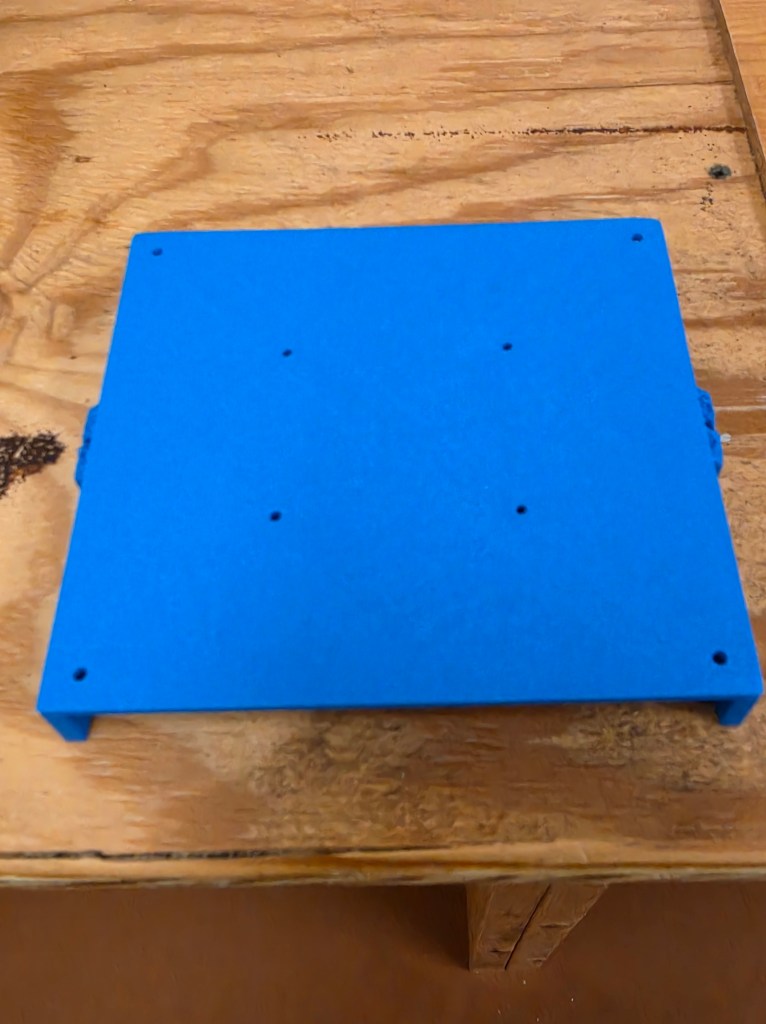
The first attempt had a geometry flaw — incorrect triangle winding that caused viewers to reject it. But on the second try, with corrected normals and a full validation pass, the file opened cleanly in PrusaSlicer. I sliced it, printed it, and it came out well.
The chassis included side rails for rigidity, four motor-mount tabs with M3 holes, a Raspberry Pi hole pattern, and corner standoff holes — everything you’d need to bolt the robot together. When my slicer suggested supports for the overhanging tabs, Claude also walked me through how to add them in eufaMake Studio, PrusaSlicer, and Meshmixer.
What fabrication files can Claude actually produce?
STL is the most common 3D printing format, but it’s far from the only fabrication file Claude can generate. The key insight is that most of these formats are either plain text (and thus easy to write directly) or simple binary structures that can be assembled with basic math and Python.
| Format | Use case |
|---|---|
.stl | 3D printing |
.obj | 3D meshes |
.scad | OpenSCAD parametric scripts |
.svg | Laser cutting |
.dxf | CNC routing / CAD |
.gcode | Direct printer motion control |
Of these, OpenSCAD (.scad) files are arguably the most powerful option — they’re human-readable code that describes geometry parametrically, so Claude can write a script where you can tweak dimensions by changing a single variable. SVG is excellent for laser-cut flat parts. DXF works for CNC routers and waterjet cutters.
The chassis printed cleanly on the first try. For a part designed entirely within a chat window, that’s a remarkable result.
There are real limits: Claude can’t run a slicer, can’t verify that a complex mesh is fully watertight, and very intricate organic shapes are better handled in dedicated CAD tools. But for functional mechanical parts — brackets, enclosures, mounting plates, robot chassis — the workflow is surprisingly capable. Describe what you need, download the file, and print.
If you’re working through a robotics or making project and need a quick part, it’s worth asking.
 DeAngelis Family Tech Interests